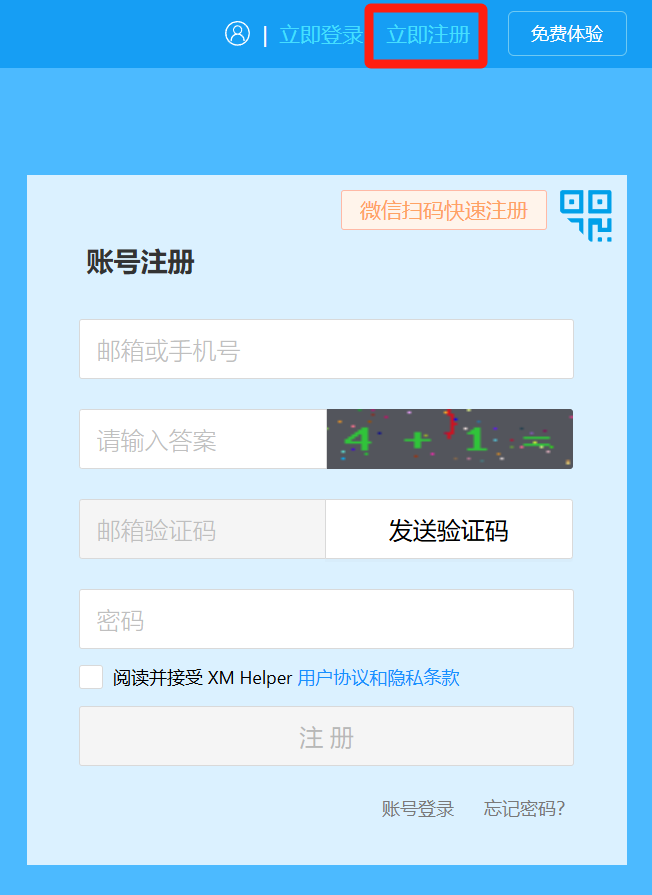
1. Account Registration
① Go to the XM Helper official website: xmhelper.com, and click the "Register" button in the top right corner.
)
② Fill in your email address and the answer to the formula in sequence.
③ Send a verification code to your email, then check your inbox to retrieve the code.
④ Set a password, click the "Register" button, and complete the registration.
2. Store Binding
① After registering an XM account and logging in, click "Enter Backend" in the top right corner.
)
② Go to "Store Management", click the "Bind Store" button, enter the platform's official page, and log in using the platform store ID for authorization.
)
③ At the bottom of the "Store Management" page, you can perform store unbinding operations.
)

Comments
0 commentsNo comments yet — be the first to speak
If this piece sparked a thought, leave a comment and share your take.